September 13, 2026 · 14 min read
Event Planners: Phased Event Accessibility Checklist with QR Captions
Phased event accessibility checklist for planners: planning, site visits, and day of actions, plus QR code captioning and practical setup tips.
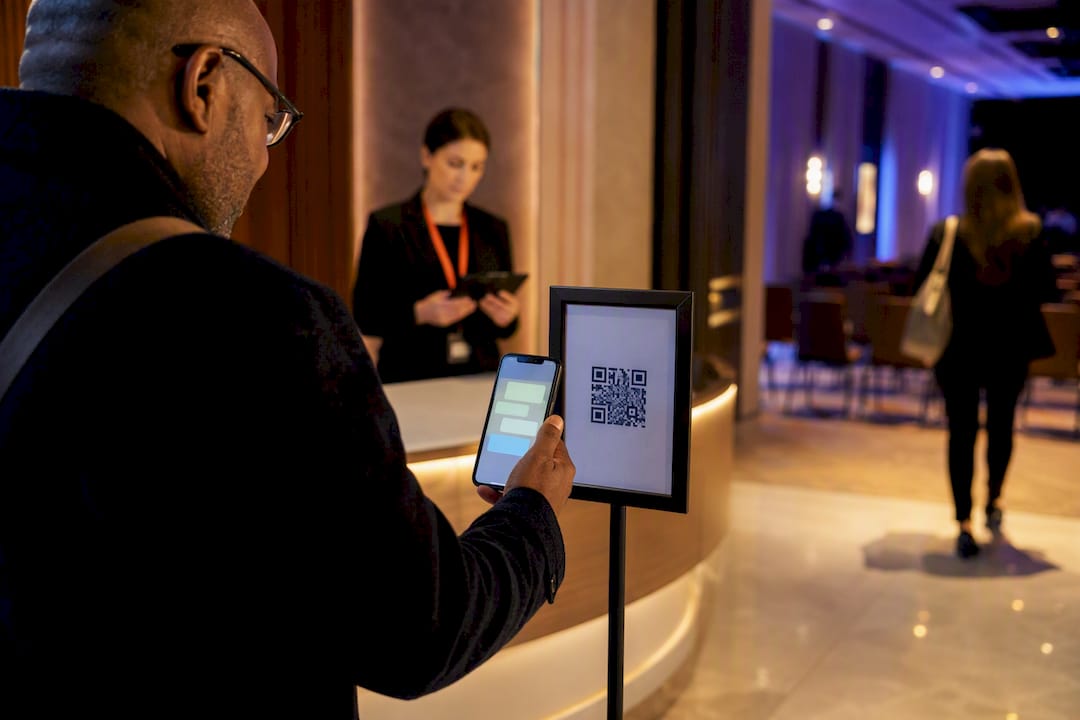
Appoint an accessibility lead and run an access check before anything else — those two moves prevent most last-minute failures. An event accessibility checklist works in phases: planning and vendor selection, venue and room layout, communication access, registration, day-of operations, and virtual delivery if you’re running hybrid. Get the sequence right and accessibility stops being an afterthought bolted onto a finished plan.
TL;DR:
- Appoint an accessibility lead with decision-making authority and include accessibility requirements in vendor contracts from the start to avoid costly retrofitting.
- Verify accessible routes and seating on-site by walking the venue, checking for obstacles, proper ramp slopes, and sightlines, rather than relying solely on floor plans.
- Book communication services like ASL interpreters and CART early, test captions with the actual AV setup, and offer mobile captioning options to scale without hardware logistics.
- Include clear, accessible information about features, accommodations, and transportation in marketing materials, using accessible formats and plain language to build attendee trust.
- Prioritize walking the event path, confirming AV functionality, and staffing key facilities on event day to ensure smooth, accessible operations for all attendees.
Table of Contents
- Event Accessibility Checklist: Planning and Vendor Selection
- Venue, Routes, and Room Layout: What to Verify On Site
- Communication Access and Technology Checklist
- Registration and Accommodation Requests: Getting the Process Right
- Day-of-Event Operations Checklist
- Virtual and Hybrid Events: Closing the Access Gap
- Accessibility Lead, Budget, and Practical Captioning Options
- Emergency Procedures and Evacuation Plans for Attendees With Disabilities
- Transportation Accessibility: Getting Attendees There and Back
- Inclusive Marketing: Telling Attendees What You’ve Built
- Priorities When You’re Short on Time
- Try Mobile Captioning for Your Next Event
- Sources
- FAQ
Event Accessibility Checklist: Planning and Vendor Selection
Retrofitting accessibility after signing contracts costs more and works worse than building it in from day one. Bring in accessibility considerations while you’re still choosing vendors, not after the deposits are gone.
- Appoint an accessibility lead with real decision authority, plus a trained backup who can step in if the lead is unavailable. This person owns budget calls, not just checklist compliance.
- Write accessibility requirements into vendor briefs and contracts covering restrooms, AV, transportation, and catering. Making accessibility a contract line item, not a verbal request, is what event planning best practices consistently recommend.
- Check transit routes, parking, and drop-off points near the venue, and require the venue to document its accessible features in writing rather than taking a verbal assurance.
- Schedule an in-person walkthrough with venue operations, AV, and catering staff present together, not in separate calls.
Naming an accessibility lead early and giving that person budget authority is what keeps access from getting quietly deprioritized once production and catering start competing for funds.
Venue, Routes, and Room Layout: What to Verify On Site
A floor plan tells you almost nothing about whether a route actually works for someone using a wheelchair or a walker. You need to walk it.
- Confirm accessible routes meet the clearance guidance in the 2010 ADA Standards for Accessible Design, check door clearances, and test ramp slopes and any level changes at thresholds.
- Disperse wheelchair spaces throughout the room rather than clustering them in one corner, and pair each with companion seating nearby.
- Confirm sightlines from wheelchair sections to the stage, screen, and any ASL interpreter or CART display.
- Walk the floor for loose gravel, uneven transitions, or cable runs that create trip hazards, and tape or ramp any cables that cross walkways.
- Confirm stage access, including a ramp or lift, if any presenter uses a mobility device.
Pro Tip: If your event uses portable restrooms, the ADA standards specify placement on firm, stable, slip-resistant ground for accessible portable restrooms, and common event-planning guidance calls for a portion of units at a temporary event to be accessible. Order accessible units by name when you book, since vendors sometimes default to standard units unless asked directly.
Communication Access and Technology Checklist
Hearing and vision access services need to be booked weeks out, not confirmed the morning of the event. ASL interpreters and CART providers get booked up fast, especially during conference season.
- Book communication services early: ASL interpreters, CART, live captioning, and assistive listening devices (ALDs).
- Test captions and interpreters on the actual event AV setup, not a separate demo system, and confirm captions display correctly on room screens and on personal devices.
- Offer more than one way to access captions. Room screens work for some attendees, but a mobile option via QR code removes the bottleneck of handing out and collecting hardware receivers. Organizers increasingly favor mobile-device captioning for exactly this reason: it scales to any room size without added hardware logistics.
- Send slides and handouts in accessible formats, meaning WCAG-friendly PDFs with real alt text, not scanned images of text. A resource like this EPUB accessibility checklist offers a useful technical reference for document structure even outside the EPUB format itself.
- Ask speakers in advance to describe visuals out loud rather than saying “as you can see here.”
Pro Tip: Run your caption and interpreter test at full volume with the room’s actual microphones, not a lavalier on a quiet stage. Feedback and echo are the most common reasons captions or interpreter audio fail on event day.
Registration and Accommodation Requests: Getting the Process Right
- Add a plain-language accommodations question to your registration form, with a few examples (“ASL interpretation,” “wheelchair seating,” “dietary restriction”) so attendees know what to ask for.
- Publish your available accessibility features (captions, ASL, accessible seating, a quiet space) alongside a named contact and a clear deadline for accommodation requests. This kind of upfront disclosure is exactly what the NYC Mayor’s Office for People with Disabilities recommends in its event planning guidance.
- Send slides and materials in advance, in accessible formats, and explain briefly how you’ll handle the privacy of any accommodation request.
- Confirm every accommodation directly with the requestor before the event, and document any back-and-forth if a request needs adjustment.
Day-of-Event Operations Checklist
The day-of checklist is where planning either pays off or falls apart. Run it in sequence, the same way an attendee would experience your event.
- Walk the full path yourself: parking, entrance, registration, session rooms, restrooms. This first-timer’s walkthrough is a standard recommendation in Cornell’s event accessibility guidance, and it catches problems no floor plan shows.
- Test every AV component: microphones, the captioning feed, interpreter sightlines, ALDs, and backup equipment for each.
- Make your accessibility contact visible, with a name badge or signage, and brief staff and volunteers on their roles and who to escalate issues to.
- Confirm food labeling is posted, the quiet room is staffed or clearly marked, service-animal space is available, and emergency exits are accessible.
Pro Tip: Announce your accessible facilities out loud at the start of the event, not just in a program note. A short verbal access check, naming where the quiet room is and how to request live captions, measurably increases how many attendees actually use the services you set up.
Virtual and Hybrid Events: Closing the Access Gap
Remote attendees deserve the same experience as people in the room, not a scaled-down version. Choose a platform with screen-reader compatibility, full keyboard navigation, and either built-in captioning or the ability to integrate a captioning provider for both live sessions and recordings.
- Test breakout rooms, chat accessibility, and caption accuracy on recorded sessions before the event, not during it.
- Assign a remote moderator whose job is watching for accessibility issues and reading important chat messages aloud for anyone who can’t see the screen.
- Publish accessibility details for platform accessibility the same way you would for the physical venue, including how remote attendees request accommodations.
- Send transcripts and accessible versions of all materials after the event closes.
Accessibility Lead, Budget, and Practical Captioning Options
Your accessibility lead should own three things: a line-item budget for captioning, interpreting, and accessible transport; vendor accountability; and final sign-off on day-of readiness. Mobile QR-code captioning cuts both cost and logistics compared to renting hardware receivers, since attendees use phones they already carry. Trial captions on your actual event vocabulary beforehand, and keep a human captioning backup ready for high-stakes sessions.
Emergency Procedures and Evacuation Plans for Attendees With Disabilities
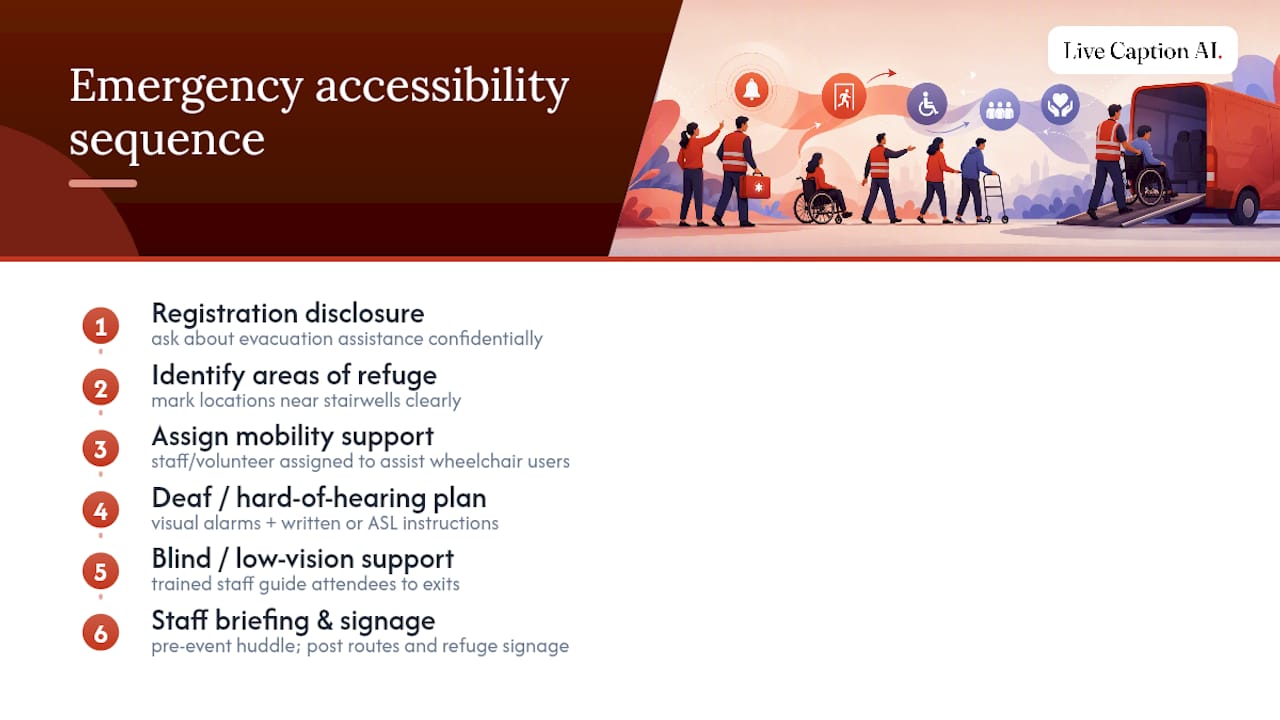
A general emergency plan is not an accessible one. Attendees who use wheelchairs, are Deaf or hard of hearing, are blind or low vision, or have cognitive disabilities each need a specific evacuation path identified in advance, not improvised during an actual emergency.
Start by identifying areas of refuge, which are protected spaces near stairwells where someone who cannot use stairs can wait safely for assistance, and confirm your venue has them clearly marked. Brief staff on where these are and who is responsible for checking them during an evacuation. Never assume an elevator will be available during a fire alarm; elevators typically shut down automatically.
For attendees who are Deaf or hard of hearing, visual alarms (strobe lights) matter as much as audible ones, and staff need a plan for delivering emergency instructions in writing or via ASL if an interpreter is present. For blind or low-vision attendees, assign a staff member or trained volunteer to guide them to an exit rather than assuming they’ll follow the crowd by sound alone.
Build your emergency plan into registration by asking, gently, whether any attendee needs evacuation assistance, and share that information only with staff who need it to help. On the day of the event, brief every staff member and volunteer on the evacuation plan during your pre-event huddle, not through a printed handout nobody reads. Post evacuation routes and areas of refuge on your signage alongside general wayfinding, so the information is visible before anyone needs it.
Transportation Accessibility: Getting Attendees There and Back
Getting into the building is only half the access problem. Getting to the building matters just as much, and it’s the piece organizers skip most often.
Confirm the venue sits on an accessible transit line, and check whether nearby stations or stops have working elevators, since transit elevator outages are common and rarely announced far in advance. If you’re arranging shuttles, request wheelchair-accessible vehicles specifically when you book, not as an assumed default, and confirm the vendor’s fleet actually has them available on your event date.
Designate accessible drop-off and pickup zones close to the accessible entrance, not the general entrance, and mark them clearly on any parking maps you distribute. If your venue charges for parking, confirm accessible spaces are available at no additional barrier and clearly signed.
For attendees traveling from out of town, include transportation accessibility details in your pre-event communications: which airport has accessible ground transport, which hotels offer accessible shuttles, and who to contact if an attendee needs to arrange paratransit. A short transportation FAQ in your registration confirmation email saves attendees from guessing and calling day-of.
If your event runs across multiple venues or days, confirm accessible transportation between locations is scheduled with enough lead time. Attendees who use mobility devices often need a longer boarding and unloading window, so build extra time into your shuttle schedule rather than running it on the same clock as general transport.
Inclusive Marketing: Telling Attendees What You’ve Built
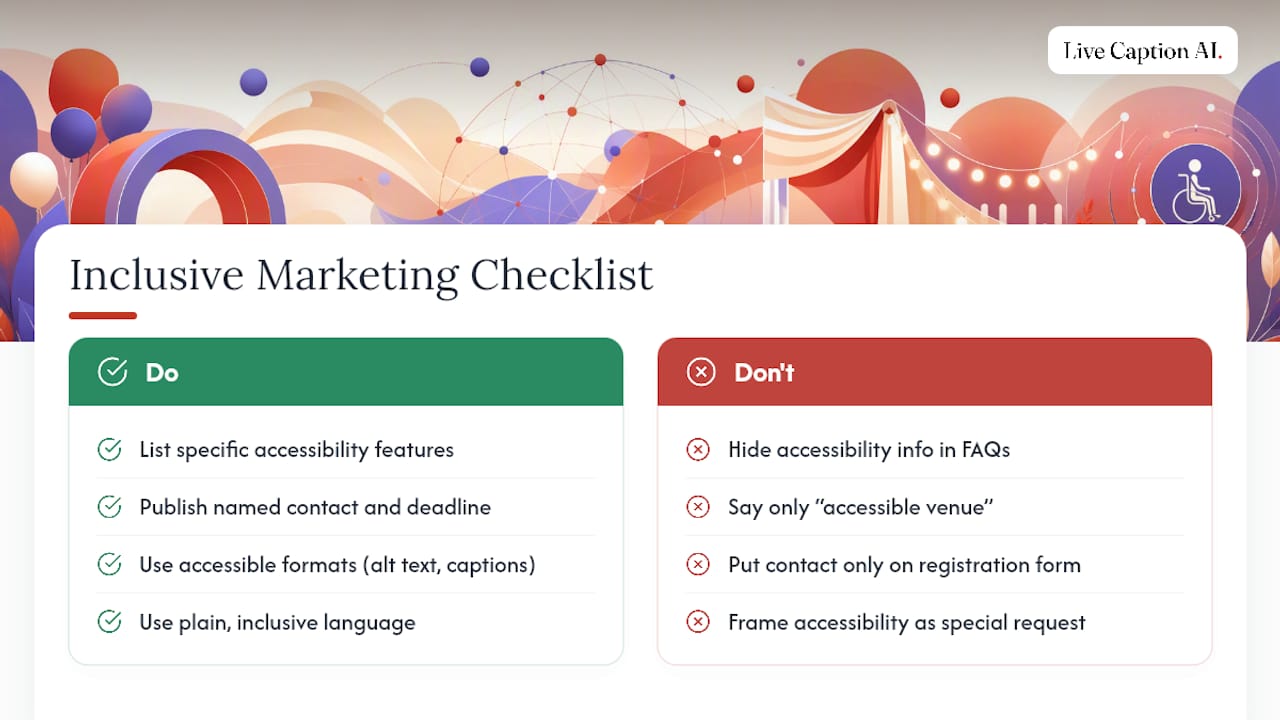
None of this planning helps attendees who don’t know it exists. Accessibility information belongs in your marketing from the first announcement, not buried in a FAQ page discovered after registration.
List your specific accessibility features directly in event promotion: captioning, ASL interpretation, wheelchair-accessible seating, a quiet space, and accessible transportation options. Naming the actual features, rather than a vague “accessible venue” line, lets attendees decide with confidence whether the event meets their needs. This kind of direct disclosure in promotional materials is exactly what NYC MOPD’s event planning guidance recommends.
Publish a named accessibility contact and a deadline for accommodation requests in every promotional channel, not just the registration form. Repeat it in confirmation emails and reminder messages, since many attendees decide whether to request an accommodation only after they’ve already registered.
Use accessible formats for the marketing itself: alt text on social graphics, captioned promotional videos, and web pages that meet basic accessibility standards. A resource on web accessibility practices is a useful reference if your team is building event pages from scratch and wants a foundation beyond a simple compliance checkbox.
Inclusive language matters too. Describe features in plain terms (“captions available for all sessions”) rather than jargon, and avoid framing accessibility as a special accommodation granted on request when a feature is actually available to everyone.
Priorities When You’re Short on Time
If you only fix three things, fix these: name an accessibility lead, confirm captioning and interpreting, and walk the venue yourself. Beyond that, three quick wins pay off fast: clear arrival signage, mobile QR-code captions, and a staffed quiet space.
— Ryan
Try Mobile Captioning for Your Next Event
Live Caption AI turns handing out caption receivers into something attendees just do with the phone already in their pocket. Instead of managing a stock of hardware devices, checking them back in, and replacing lost units, you post a QR code and attendees scan it to get live captions on their own screen.

That single change removes one of the most common day-of headaches organizers report: receiver logistics. No inventory to track, no charging stations, no collection table at the exit. Captions display in real time, tuned for the specific terminology of your event, whether medical, legal, or general conference content. If you’re weighing captioning options for an upcoming event, you can try Live Caption AI and test it against your own session material before committing to a plan.
Sources
Start with the ADA design standards, then check Cornell’s checklist and USC’s accessible event checklist.
- 2010 ADA Standards for Accessible Design
- Accessible Meeting and Event Checklist – Cornell University
- Planning an Accessible Event – NYC Mayor’s Office for People with Disabilities
FAQ
What Is the First Step in an Event Accessibility Checklist?
Appoint an accessibility lead with real budget authority before booking vendors or a venue, then confirm accessibility features directly with the venue in writing.
How Many Portable Restrooms Need to Be Accessible?
Common event-planning guidance calls for a portion of portable restrooms at a temporary event to be accessible, placed on firm, stable, and slip-resistant ground per the ADA standards.
When Should I Book ASL Interpreters or CART Services?
Book communication access services as early as possible in your planning timeline, since qualified interpreters and CART providers are often booked out weeks in advance, especially during busy conference seasons.
Does Mobile QR-Code Captioning Work for Large Venues?
Yes. Mobile-device captioning delivered via QR code scales to any room size without the hardware distribution and collection overhead that receiver-based systems require, which is why platforms like Live Caption AI use this delivery model.
What Should Go in a Pre-Event Accessibility Announcement?
Announce the location of accessible facilities, how to use available assistive technology, and how to request live captions or interpretation, since a short verbal access check increases actual use of the services you’ve set up.