August 29, 2026 · 12 min read
Captioning Software Cost for Churches and Orgs: $19.99 Live AI
Compare captioning costs for churches and orgs: AI $0.04–$0.30/min, human $1–$3+/min, budgeting scenarios, and a $19.99 Live AI option.
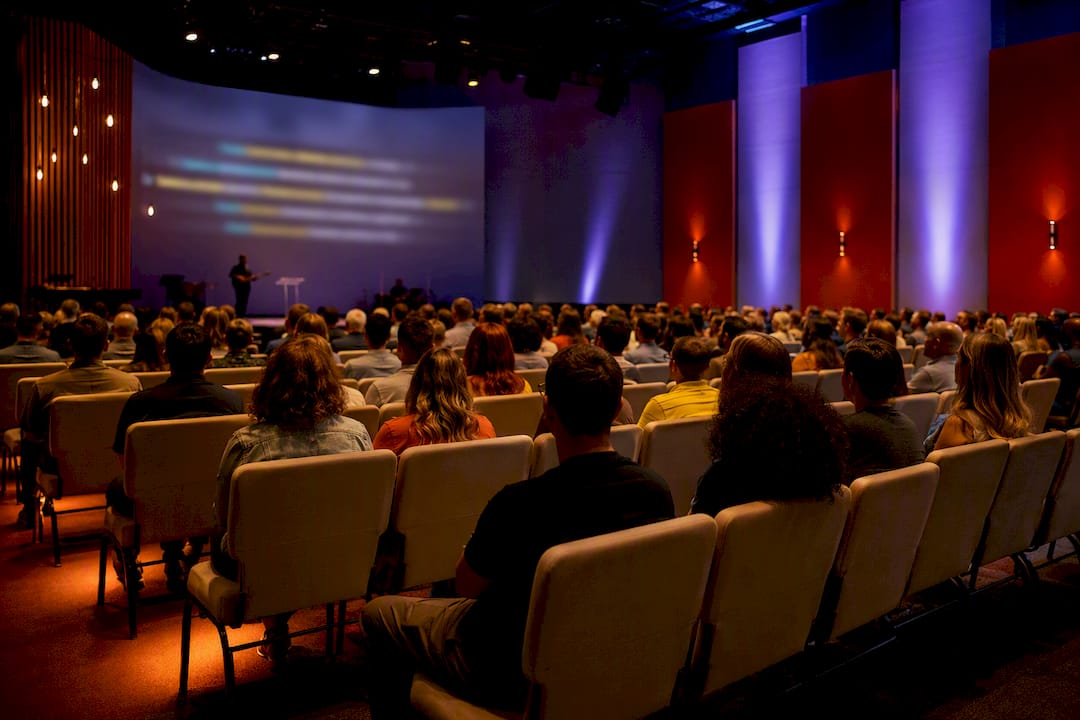
Captioning software costs range from free to over $3 per minute, and the deciding factor is almost never the vendor. It’s the accuracy level you need. Automated AI captions run roughly $0.04 to $0.30 per minute or come bundled in monthly subscriptions, human-verified captions cost $1 to $3+ per minute depending on turnaround and verbatim requirements, and live human captioning (CART) runs into the hundreds of dollars per hour. Pick your method based on required accuracy first, budget second.
TL;DR:
- Automated AI captioning costs between $0.04 and $0.30 per minute, making it suitable for low-stakes content, with accuracy around 85 to 95 percent.
- Human-verified captions range from $1 to over $3 per minute and are essential for legal, broadcast, or ADA-compliant content, especially when high accuracy is required.
- Live AI captioning typically involves monthly subscription fees or per-session credits, while live human captioning (CART) costs several hundred dollars per hour, depending on event duration.
- Hidden costs such as setup, integration, vocabulary tuning, editing labor, storage, and compliance support can substantially increase the total expense beyond the initial subscription or per-minute rate.
- For organizations with recurring or extensive captioning needs, hybrid workflows combining AI and human review offer cost-effective accuracy and speed.
Table of Contents
- How Much Does Captioning Software Cost Per Minute?
- Cost Breakdown by Method: How Billing Actually Works
- What Hidden Costs Should You Budget For?
- Sample Cost Calculations for Three Common Scenarios
- What to Ask Vendors Before You Sign
- Why Live Caption AI Is a Practical Lower-Cost Live-Caption Option for Worship and Events
- Where These Numbers Come From
- Get Live Captioning Without the Stenographer Bill
- Sources
How Much Does Captioning Software Cost Per Minute?
Before you sign anything, it helps to see the five common pricing paths side by side. Rates shift by vendor and contract length, but the ranges below reflect what buyers typically encounter across the industry.
| Method | Typical rate | Best for |
|---|---|---|
| Pay-as-you-go AI captions | low per-minute fee | Occasional uploads, social clips, low-stakes internal video |
| Subscription AI (monthly minute bundle) | monthly fee with set minute allowances | Regular publishers who need predictable monthly spend |
| Human post-edit captions | several dollars per minute | Legal, broadcast, and ADA-sensitive publishing |
| Live AI captions | monthly subscription or per-session credits | Church services, webinars, internal meetings |
| Live human/CART | high hourly rates | Courtrooms, conferences, high-stakes public events |
Pay-as-you-go AI captioning is the cheapest entry point, and it works fine when errors are cosmetic rather than legal. Subscription AI plans make sense once you’re captioning consistently. Human-verified captions cost more because a person is reading every line against the audio. Industry pricing pages commonly list human rates starting near $1 to $2 per minute and climbing for rush turnaround or verbatim formatting.
Live captioning splits into two very different products. Live AI transcribes speech in near real time with no human in the loop, which keeps costs low. Live human captioning, often called CART (Communication Access Realtime Translation), uses a trained stenographer or captioner working the event live, and that labor shows up in the hourly rate.
Watch for add-on fees that don’t appear in the headline price: translation into a second language, “burned in” captions that are permanently embedded in the video file, and export or embedding charges some platforms tack on per file. Pro Tip: Ask every vendor whether translation is priced per minute, per language pair, or as a flat add-on. That single line item can double your monthly bill if you’re running multilingual services.
Cost Breakdown by Method: How Billing Actually Works
Every captioning method bills differently, and understanding the mechanics behind the sticker price is what keeps you from getting surprised on invoice day.
Automated AI captioning is usually billed per minute of source audio or video, not per minute of output. A pay-as-you-go plan might charge $0.10 per minute, so a 45-minute sermon or webinar costs about $4.50 to caption automatically. Subscription plans bundle a set number of minutes per month, which lowers the effective per-minute rate if you use most of the allowance, but you pay the same fee even in a light month. Some platforms bill by character count instead of time, particularly for translation or subtitle-burning services, which can quietly change your math if your content is dense with dialogue.
- Pay-as-you-go AI: best for irregular or seasonal captioning needs
- Subscription AI: best when you caption weekly or more
- Character-based billing: watch for this on translation and burn-in services specifically
- Accuracy ceiling: automated captions typically run 85 to 95 percent accurate depending on audio quality and accents, fine for internal use but risky for legal or broadcast contexts
Human-verified captioning starts with an automated draft in most modern workflows, then a person corrects it against the audio. That labor is why per-minute rates jump to $1 to $3 or higher. Vendors often set minimum order sizes (some require a 15 or 30-minute minimum per file) and tier turnaround speed: standard delivery in 24 to 48 hours costs less than rush delivery in a few hours. Legal depositions, broadcast television, and any content published under a strict ADA compliance mandate typically require this tier, because WCAG’s guidance on live captions sets accuracy expectations that automated tools alone often can’t guarantee for public-facing content.
Live captioning is where the cost gap widens the most. Live AI captioning processes speech as it happens with a short delay, usually a few seconds, and is priced as a flat monthly fee or per-session credit system. Live human captioning, the CART model, requires a certified stenographer working the event in real time and billed hourly, often with a minimum booking window of one or two hours even for a 30-minute event. That minimum is one of the most overlooked costs in event budgeting.
Hybrid workflows combine an AI-first pass with human quality control after the fact. An organization might use live AI during the event for immediate accessibility, then send the recording for human editing before archiving it for legal or SEO purposes. This costs more than pure AI but far less than live human captioning, and it’s become common for organizations that need both real-time accessibility and a polished final transcript.
What Hidden Costs Should You Budget For?
The subscription price on a vendor’s homepage is rarely the number you actually pay by year’s end. Total cost of ownership includes several line items buyers routinely forget to budget for.
- Setup and integration — connecting captioning software to your streaming platform, church AV system, or learning management system can take staff hours or a paid integration service, especially for on-prem software.
- Custom vocabulary tuning — feeding a system your organization’s specific terms (names, product terms, scripture references, medical or legal jargon) improves accuracy but takes time to build and maintain.
- Editing and QC labor — if you’re not paying a vendor for human review, someone on your team is spending hours checking captions before publishing. At $20 to $40 an hour for a staffer’s time, this adds up fast across a busy content calendar.
- Consumption and storage fees — cloud processing, file storage, and export limits sometimes bill separately from your base subscription.
- Mandatory support renewals — some on-prem or desktop captioning software requires a first-year support fee bundled into the purchase price, then an annual renewal after that, which raises effective first-year cost well above the sticker number.
Compliance risk belongs in this budget too. The Department of Justice recently [extended certain accessibility compliance deadlines for state and local governments](https://advocacy.sba.gov/2026/04/27/doj-extends-compliance-dates-for-state-and-local-governments-to-make-their websites-accessible/), but that grace period won’t last forever, and public entities that wait until the deadline to upgrade from automated-only captions often pay rush pricing for human review services.
Pro Tip: Run a 90-day pilot before committing to an annual contract. Track actual staff editing hours during that window. Most organizations underestimate QC labor by half until they’ve measured it.
Sample Cost Calculations for Three Common Scenarios
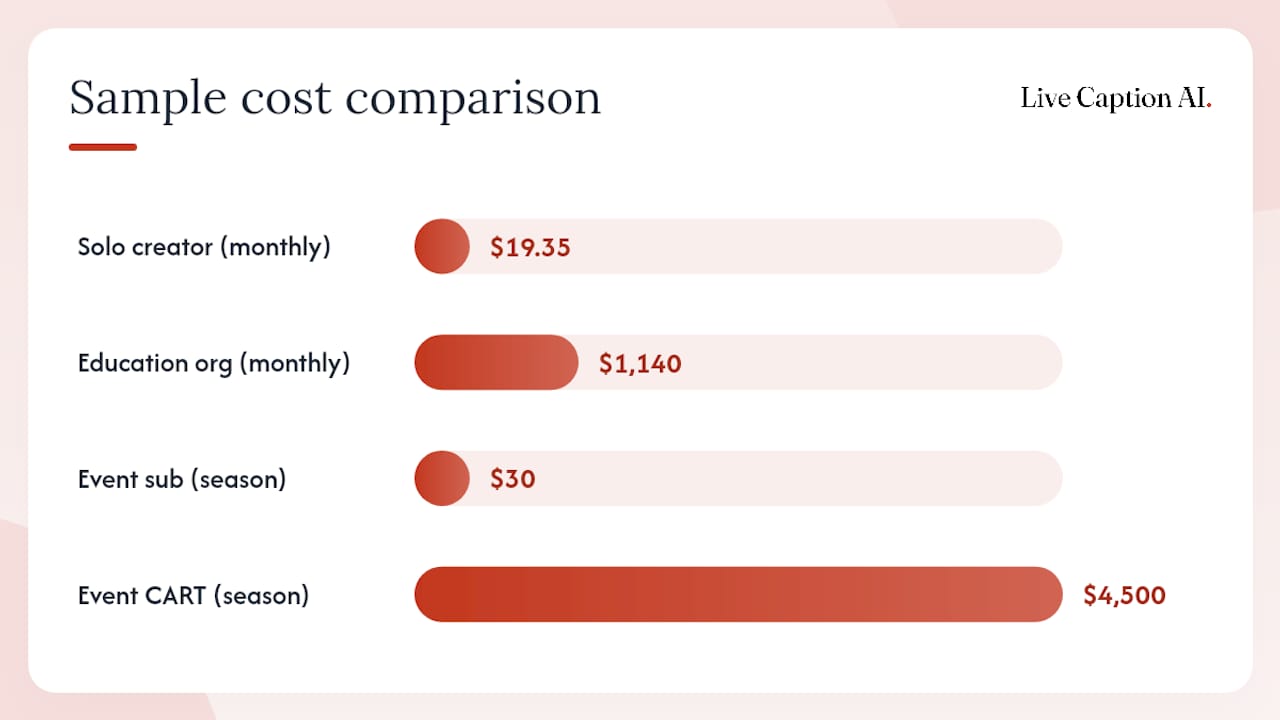
Concrete numbers beat abstract ranges. Here’s how the math plays out for three typical buyers.
Scenario A: Solo creator, 30 minutes of social clips per week. At $0.15 per minute pay-as-you-go, that’s $4.50 weekly, or about $18 to $19.50 a month, depending on the number of weeks. A subscription plan bundling a set number of minutes for a monthly fee would cost less if usage is consistent, but could be more expensive in a light usage month.
- Weekly cost: 30 min × $0.15 = $4.50
- Monthly cost (4.3 weeks average): approximately $19.35
- Annual cost: roughly $232
Scenario B: Education organization, 50 hours (3,000 minutes) per month, mixed automated and human review. Say 80 percent runs through automated captioning at $0.10 per minute (2,400 minutes = $240) and 20 percent needs human verification at $1.50 per minute (600 minutes = $900). Total monthly cost: $1,140, or roughly $13,680 a year. Many vendors offer volume discounts above 2,000 to 5,000 minutes monthly, which can shave 10 to 20 percent off the human-review portion.
- Automated portion: 2,400 min × $0.10 = $240
- Human-verified portion: 600 min × $1.50 = $900
- Monthly total: $1,140
Scenario C: Event series, ten events at three hours each (30 hours total). Live AI captioning across all ten events at a flat $30 monthly subscription costs $30 for the whole season if usage fits your plan tier, plus any per-session credits for overage. Hiring a CART provider at $150 per hour with a two-hour minimum per event costs at least $450 per event, or $4,500 for the season, not counting travel fees for an on-site stenographer. The gap between those two numbers is the reason so many event organizers have shifted toward AI-based live captioning for anything short of a legal or medical proceeding.
What to Ask Vendors Before You Sign
Run every finalist through the same questions so you’re comparing real total cost, not marketing copy.
- How is billing calculated, and what happens on overage? Get the per-minute overage rate in writing, not a verbal promise.
- How are minutes counted and rounded? Some vendors round up to the nearest minute per file, which inflates costs on many short clips.
- What export formats are included? Confirm SRT, TXT, JSON, and PDF exports are standard, not a paid add-on, and ask whether captions can be embedded directly into your video file.
- What’s the turnaround SLA, and what accuracy rate do they claim, backed by what proof?
- Is audio or transcript data stored, and for how long? Ask directly whether the vendor retains your audio files after processing, and who can access finished transcripts.
Red flags worth walking away from: vague overage terms, no export options beyond one proprietary format, no mention of accessibility standards at all, and SLAs that promise “fast” turnaround without a specific number attached.
Why Live Caption AI Is a Practical Lower-Cost Live-Caption Option for Worship and Events
Most of the pricing gaps in this guide come down to one thing: hardware and staffing. Live Caption AI removes both. The Professional plan runs $19.99 a month, well under a single hour of CART stenography, and a Free tier is available with signup (the public demo requires no signup at all). A Team tier is coming soon at $59.99, though it isn’t purchasable yet. Business plans are also available for larger deployments.
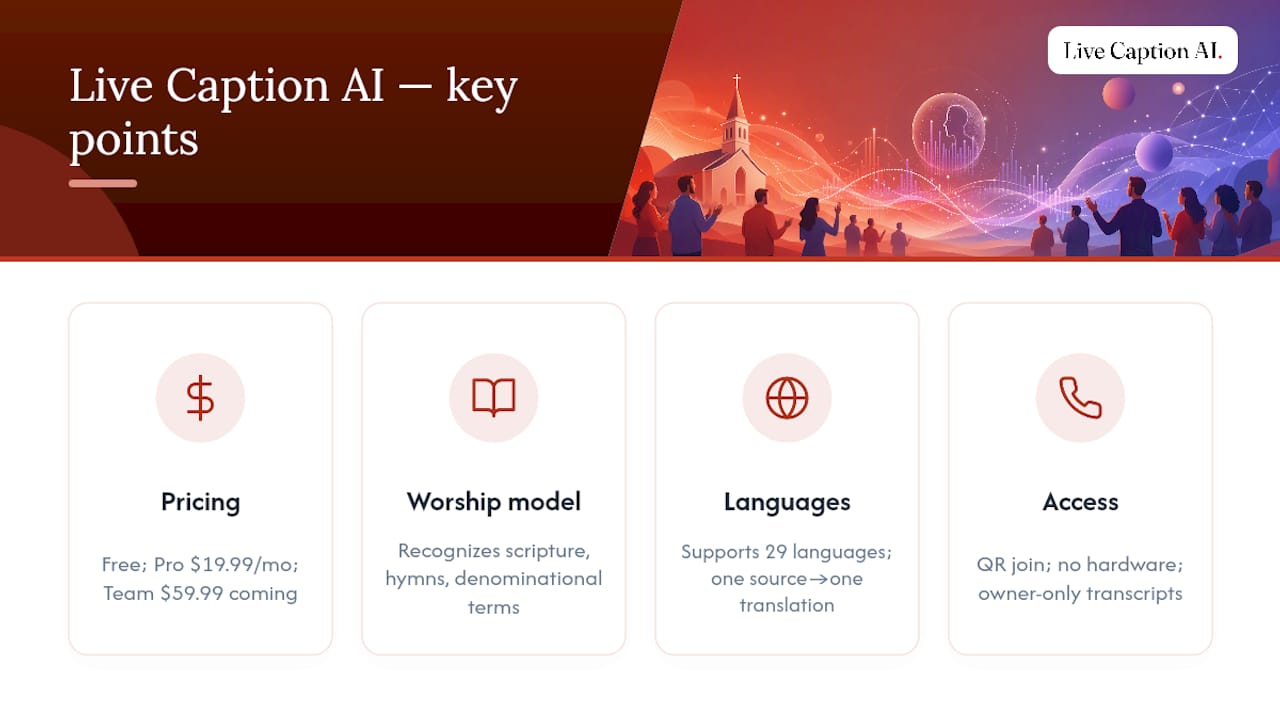
For churches specifically, the Worship & Ministry model is built to recognize terminology that a general speech-to-text engine misses, scripture references, hymn titles, denominational vocabulary, so captions read cleanly without manual correction. Live Caption AI supports 29 languages, though each session runs one source language to one translated target, so a bilingual service produces one translated stream rather than several running simultaneously.
Attendees join by scanning a QR code on their own phone, no receiver hardware, no rented equipment. The speaker sees a live concurrent viewer count during the service, though there’s no attendance report or analytics dashboard afterward. Broadcast links can point viewers toward giving pages, calendars, or sign-up forms. Transcripts export as TXT, SRT, JSON, or PDF, audio is never stored, and finished transcripts stay visible only to the account owner.
— Ryan
Where These Numbers Come From
The World Health Organization documents over 430 million people worldwide with disabling hearing loss, the baseline case for budgeting captioning at all. WCAG’s live caption guidance informs the accuracy standards referenced throughout, Aspect’s TCO framework shaped the hidden-costs section, and the SBA’s note on DOJ compliance timelines supports the regulatory urgency discussion.
Get Live Captioning Without the Stenographer Bill
Live Caption AI is the alternative to hiring a stenographer or renting captioning hardware for your services and events. Where CART providers charge by the hour and require advance booking, Live Caption AI runs from a $19.99 monthly subscription with no hardware to buy and no crew to schedule.

If you run a church service, a conference, or a recurring webinar and want captions your congregation or attendees can read on their own phones, the Worship & Ministry model is built for exactly that use case, picking up terminology generic tools miss. Explore live captioning options for events to see how the QR-code delivery system works in practice, then start a Free trial to test it during your next live session before committing to a paid plan.
Sources
- Deafness and hearing loss — World Health Organization
- TCO calculator and guidance — Aspect
- DOJ extends compliance dates for state and local governments to make their websites accessible — SBA Office of Advocacy