August 23, 2026 · 17 min read
Accessibility for Schools: A Practical Compliance Roadmap
Ensure every student thrives with practical steps for accessibility in schools. Start improving physical and digital access today!
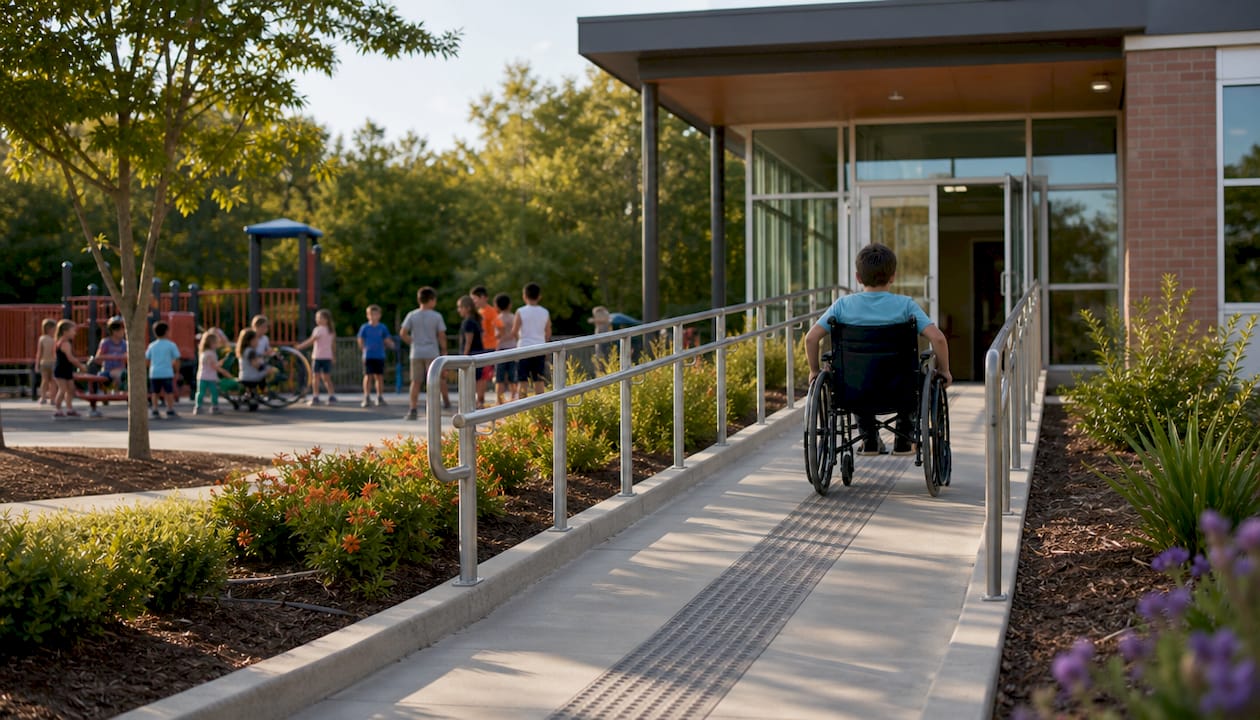
Accessibility for schools means ensuring physical access, digital access, and instructional access work together so every student and family member can participate fully. Start with the highest-impact, lowest-cost fixes: caption your videos and assemblies, remediate the PDFs on your top-traffic web pages, and audit your building’s routes and seating. The legal backdrop matters here. The DOJ’s updated Title II rule requires district websites and apps to conform to WCAG 2.1 Level AA, and the U.S. Department of Education’s inclusive practices guidance frames Universal Design for Learning as the proactive companion to that legal floor. A tool like Live Caption AI can cover one immediate gap: live captions for assemblies and lectures without a stenographer budget.
Priorities to tackle first:
-
Caption live events, recorded lessons, and video posted to your website.
-
Remediate PDFs and forms on your five most visited web pages.
-
Walk your main building and one athletic venue with an accessibility checklist.
-
Confirm your procurement process asks vendors for accessibility documentation.
Key Takeaways
Effective school accessibility combines physical facility fixes, digital remediation under WCAG 2.1 AA, and proactive UDL-based instruction, backed by governance that treats compliance as ongoing rather than a one-time project.
| Point | Details |
|---|---|
| Triage digital assets first | Fix your home page, calendar, and staff directory before tackling the rest of the site. |
| Build procurement safeguards | Require WCAG attestation and vendor ACRs before signing any new ed-tech contract. |
| Adopt UDL proactively | Design lessons for variation up front to cut down on individual accommodation requests later. |
| Coordinate emergency and transportation plans | Review evacuation and bus plans for every student with a mobility, sensory, or communication need each year. |
| Use low-cost captioning for live events | Live Caption AI offers QR-based captions in 29 languages starting at $19.99 a month for assemblies and lectures. |
Table of Contents
-
Classroom Supports: IEPs, Section 504, and Assistive Technology
-
Live Captioning for Assemblies and Lectures: Where Live Caption AI Fits
-
Communication Accessibility for Non-Verbal or Hearing-Impaired Students
-
Emergency Preparedness and Evacuation Plans for All Accessibility Needs
-
Accessibility for Extracurricular Activities and Sports Programs
-
An Editor’s Take: Access Fuels Engagement, Not Just Compliance
Physical Accessibility for School Buildings and Events
A “fully accessible” space lets a wheelchair user, a person with low vision, and a parent using a walker move through it independently, from parking to entrance to restroom to seating. A “partially accessible” space has gaps: a ramp that leads to a locked door, an accessible restroom stocked as a closet, bleacher seating with no clear path. Both labels matter for planning, but only one actually works for a family showing up on game night.
Critical features to verify: entrances without stairs as the only option, routes at least 36 inches wide free of obstruction, restrooms with grab bars and clear floor space, and seating areas that don’t isolate a wheelchair user from their class or family section.
For assemblies and athletic events, run through this before doors open:
-
Confirm an accessible route from parking and drop-off to the venue entrance.
-
Reserve visible, dispersed seating, not just a roped-off corner in the back.
-
Set up an assistive listening system or captioning for the PA feed.
-
Post signage indicating accessible restrooms and exits.
-
Assign a staff contact who can respond to access requests in real time.
Document what you find in a simple building inventory, room by room, and route it to your facilities director. When a space fails the checklist, contact your state’s ADA coordinator office or a certified access specialist for a formal survey rather than guessing at fixes.
Pro Tip: Walk the route yourself in a borrowed wheelchair once a year. Ten minutes of doing it firsthand catches problems a clipboard checklist misses.
Digital Accessibility: Websites, Apps, Documents, and Video
Digital accessibility for schools now runs on a fixed legal timeline, not a best-practices suggestion. The DOJ’s Title II rule requires public K-12 websites and mobile apps to meet WCAG 2.1 Level AA, with staggered deadlines: larger districts face earlier dates, and many smaller districts have deadlines extended into 2027 or 2028. That grace period is not permission to wait.
Covered content includes:
-
Your public-facing website, including every subsite and microsite.
-
Mobile apps used for enrollment, communication, or instruction.
-
PDFs, forms, and documents posted for public download.
-
Video content, whether recorded lessons, board meeting streams, or promotional clips.
-
Third-party and vendor-embedded tools, which remain your responsibility even when a vendor built them.
Few districts surveyed in one report had completed or nearly completed their digital accessibility updates, and the same reporting found staff awareness and training gaps as the leading barriers, cited by nearly all respondents, according to K-12 Dive. That gap is closable with a workflow, not a miracle.
Run an audit against your highest-traffic pages first: home page, calendar, staff directory, enrollment forms. Manual PDF remediation runs $5 to $25 per page when done by hand, which is why automation-first remediation tools that cut that cost by 70% to 95% deserve serious budget consideration for large document backlogs. Require Accessibility Conformance Reports from every vendor during procurement, and add captions to assembly and lecture video, where Live Caption AI’s tag on assistive captioning technology covers practical setup examples for that specific use case.
Classroom Supports: IEPs, Section 504, and Assistive Technology
An IEP team or a 504 team makes an individualized determination about what a specific student needs. Neither this article nor any accessibility vendor can tell you a student “qualifies” for a given accommodation. That call belongs to the team, built around evaluation data, family input, and classroom observation. What a school can do at the systems level is make sure the tools those teams might recommend already exist and work when called for.
Common assistive technologies worth having in place before a team asks for them:
-
Screen readers for students with visual impairments or reading disabilities.
-
Braille materials and embossers for students with visual disabilities.
-
Live captioning for students who are deaf, hard of hearing, or benefit from text reinforcement during lectures.
-
Alternative format textbooks and materials, including audio and large-print versions.
-
Speech-to-text and text-to-speech software for writing and reading support.
Coordinate classroom practice with the IEP or 504 plan directly. A teacher captioning a lecture for the whole class benefits a student whose plan calls for captions without singling them out. Loop families into technology decisions early. A parent who knows a screen reader is coming home on a school-issued device can reinforce it there, and that consistency between home and classroom is often what makes an accommodation actually work.
UDL, MTSS, PBIS, and the Governance That Sustains Them
Universal Design for Learning flips the sequence most schools default to. Instead of building one lesson and retrofitting it for individual students, UDL asks teachers to plan for variation up front across three areas: engagement, representation, and action and expression. A lecture recorded with captions, offered as both video and transcript, and paired with multiple ways to demonstrate understanding, serves a wider range of students before anyone requests an accommodation.
MTSS and PBIS extend that logic to academic and behavioral support. Multi-Tiered System of Supports catches learning gaps early through tiered intervention, and Positive Behavioral Interventions and Supports builds a school climate where behavioral expectations are taught, not assumed. Both reduce how often a school reaches for an individual accommodation as the first line of defense, which ED’s own inclusive practices guidance frames as the point: inclusion works best as a whole-school design, not a series of individual patches.
Governance makes this last past one enthusiastic staff member’s tenure:
-
Stand up a cross-department steering committee: special education, IT, communications, facilities.
-
Update board policy language to reference WCAG 2.1 AA and UDL explicitly.
-
Build a conformance timeline with named owners and dates, not just intentions.
-
Add accessibility responsibilities into job descriptions for web and content staff.
Pro Tip: Put a specific person’s name next to each governance action. “Someone should update the policy” never gets updated. Educators looking to build UDL fluency across a staff can start with a course like EmpowerED’s Universal Design for Learning training, built specifically for K-12 instructional teams.
Procurement Language, Vendor Checks, and Staff Training
Sustainable accessibility programs move the checkpoint upstream, into the contract, rather than downstream into a scramble after launch. The NCADEMI Roadmap recommends building this in as standard procurement practice, not a special request.
-
Require WCAG 2.1 AA attestation in every RFP for digital tools or content.
-
Request an Accessibility Conformance Report from vendors and verify claims against a sample, not just the cover letter.
-
Write remediation service-level agreements into contracts so fixes have a deadline, not a promise.
-
Build role-based training: communications staff learn alt text and document structure, IT staff learn platform settings, procurement staff learn what to ask vendors.
-
Schedule audits on a recurring cadence, not as a one-time project, and triage the home page, calendar, and staff directory first when time is short.
A one-time technical cleanup drifts back out of conformance within a year. A procurement-first, policy-backed approach holds because the checks live in the contract, not in someone’s memory.
Where to Find Help: Resources and Internal Contacts
Start with primary sources: the DOJ’s Title II web rule, the Department of Education’s inclusive practices guidance, and the NCADEMI Roadmap, which walks state and local agencies through committee formation, inventory building, and audit sequencing step by step.
Build a short internal contact list before you need it: your special education director, communications lead, IT lead, and procurement officer. These four people touch nearly every accessibility decision a district makes, and putting them in one room early saves months of back-and-forth later.
Two actions to take this week: build a digital and physical accessibility inventory across your buildings and web properties, and schedule your first audit with a named owner and a date on the calendar.
Live Captioning for Assemblies and Lectures: Where Live Caption AI Fits
Live Caption AI works through a QR code. Attendees scan it with their own phone, and captions appear on their screen in real time, with no app download and no dedicated hardware. For an assembly or a guest lecture, that removes the two biggest barriers to captioning: cost and setup time.
Verifiable features worth knowing before you pilot it:
-
Supports 29 languages, translating one source language to one target language per session.
-
Exports transcripts as TXT, SRT, JSON, or PDF for reuse in newsletters or recaps.
-
Never stores session audio, and transcripts remain visible only to the account owner.
-
Pro plan runs $19.99 a month, with a free tier available after signup. Try a Demo here.
Live Caption AI is a captioning tool, not a legal determination. It does not certify FERPA compliance, satisfy an IEP or 504 accommodation on its own, or connect to your LMS or student information system. Document its use in your accessibility plan and loop in special education staff so the tool supports, rather than substitutes for, the team’s decision.
Transportation Accessibility for Students With Disabilities
A student who can’t get to school on equal footing with classmates is locked out before the first bell rings. Transportation accessibility covers the full chain: pickup location, vehicle boarding, ride duration, and drop-off, and each link needs its own check.
Wheelchair-accessible buses need working lifts or ramps, secured tie-down systems, and drivers trained to use them without turning boarding into a spectacle. Ride time matters as much as the vehicle itself. A student with a medical condition or a behavioral support plan may need a shorter route or a smaller vehicle, and that routing decision usually flows from the IEP or 504 team rather than the transportation department acting alone.
Coordination between departments is where this most often breaks down. Transportation staff need advance notice of a student’s mobility equipment, communication needs, or medical requirements, not a surprise on the first day of school. Build a standing communication channel between the transportation director and the special education office, refreshed at the start of each year and whenever a student’s plan changes mid-year.
For field trips and athletic travel, the same standard applies as for daily bus routes. A wheelchair-accessible bus for the morning commute but a stair-only charter for the away game is not equal access, it is a gap that shows up exactly when a family is watching most closely. Build accessible transportation into the request process for every off-campus trip, not just the ones where someone remembers to ask.
Communication Accessibility for Non-Verbal or Hearing-Impaired Students
Communication access spans a wider range of needs than most accessibility checklists account for. A student who is deaf or hard of hearing may need real-time captioning, an ASL interpreter, or both, depending on the setting and their own preference. A non-verbal student may rely on an augmentative and alternative communication device, a picture exchange system, or a communication board, and that device needs to travel with them to every classroom, assembly, and field trip, not just their home base.
Staff training makes the difference between a device that sits in a backpack and one that actually gets used. Teachers, aides, and even substitute staff need at least a working knowledge of how a student’s communication system functions, what prompts to give, and how to respond when the student initiates contact through it.
For hearing-impaired students, captioning extends beyond the classroom into assemblies, sports events, and school-wide announcements over a PA system. A live captioning tool that displays on a personal phone screen, like the QR-based system Live Caption AI uses, solves a problem that fixed-caption displays and printed handouts can’t: it follows the student wherever they’re sitting, rather than requiring them to sit in one designated spot to see a screen.
Family communication deserves the same attention as classroom communication. A hearing-impaired parent attending a conference or a non-verbal student’s family reviewing a behavior plan both need an accessible communication path, whether that’s a live interpreter, a captioned video call, or a written summary they can review at their own pace.

Emergency Preparedness and Evacuation Plans for All Accessibility Needs
A fire drill that works perfectly for ambulatory students can fail entirely for a student who uses a wheelchair, has a sensory processing difference, or can’t hear an alarm. Evacuation planning has to build in every access need from the start, not as an afterthought handled by whichever staff member happens to be nearby that day.
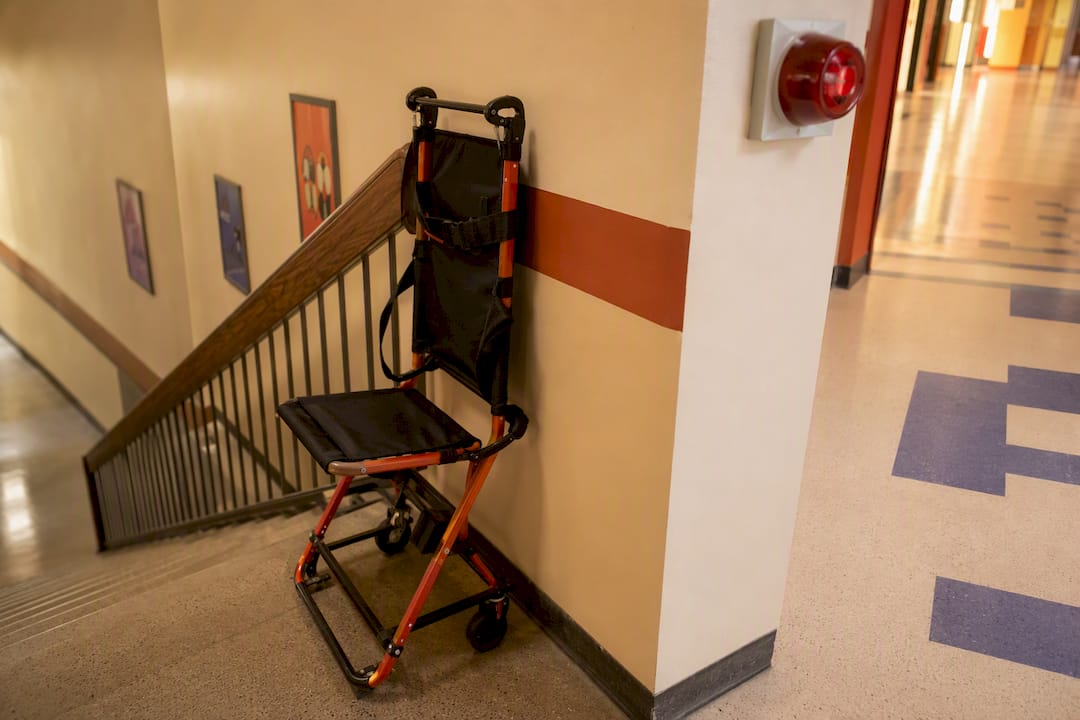
Individual evacuation plans matter for students with mobility, sensory, or medical needs that a standard drill doesn’t address. That plan should name a specific staff member responsible for that student during an emergency, identify the evacuation route and any equipment needed (an evacuation chair for stairwells, for instance), and get reviewed at the start of every school year alongside any IEP or 504 update.
Alert systems need a visual component for students who are deaf or hard of hearing: strobe lights paired with audible alarms, not audible alarms alone. Students with sensory sensitivities may need a modified alert, since a full-volume siren can trigger a severe reaction that makes evacuation harder, not easier.
Staff training has to include hands-on practice, not just a memo. Running an actual drill with an evacuation chair, practicing a communication protocol with a non-verbal student’s AAC device, and walking the accessible evacuation route as a team surfaces problems that a written plan alone never catches. Coordinate with local fire and emergency services too. They should know in advance which classrooms house students with mobility or communication needs, so a real emergency doesn’t start with them learning that information cold.
Accessibility for Extracurricular Activities and Sports Programs
Extracurriculars are where inclusion policy meets reality fastest, because participation is voluntary and the stakes feel personal to a student choosing whether to try out for a team or join a club. A school that nails classroom accessibility but leaves extracurriculars as an afterthought sends a clear message about where students with disabilities actually belong.
Athletic facilities need the same physical access review as classroom buildings: accessible locker rooms, routes to fields and courts, and seating for spectators that doesn’t segregate students with disabilities from their teammates and friends. Beyond facilities, programs need a genuine pathway for participation, whether that’s adaptive sports offerings, modified rules that let a student with a disability compete alongside peers, or a role like team manager or statistician for a student who wants to be part of the team in a different capacity.
Clubs and performing arts groups face their own access questions. A drama club needs to think about whether rehearsal spaces and stages are reachable, whether a non-verbal student can participate in a way that fits their communication style, and whether captioning or interpretation makes a performance accessible to deaf or hard-of-hearing audience members and cast members alike.
Documentation matters here too. Track which extracurriculars have completed an accessibility review and which haven’t, the same way you’d track it for a classroom building. A pattern of a few “flagship” programs getting attention while others get ignored is worth catching before a family notices it first.
An Editor’s Take: Access Fuels Engagement, Not Just Compliance
Accessibility and audience engagement aren’t separate goals: a captioned assembly holds attention better and reaches more families than one that doesn’t. Don’t wait for a perfect systemwide plan. Fix the highest-traffic page and the next live event this month.
— Ryan
Try Live Caption AI for Your Next Assembly or Lecture
Adding captions to a school assembly used to mean booking a stenographer or buying dedicated hardware, both of which get expensive fast for a district juggling dozens of events a year. Live Caption AI works differently: attendees scan a QR code with their own phone and read live captions right there, in one of 29 languages, with no app to install and no equipment to rent.

For a lecture series, a board meeting, or a school assembly, that’s a captioning option a communications office or special education department can set up in minutes rather than weeks. Speaker links can point attendees to a sign-up page or resource site, and transcripts export afterward as TXT, SRT, JSON, or PDF, ready to become a recap post or a reference document for staff who missed the session. Visit the Live Caption AI landing page to start a free trial and see how it runs during your next live event.
Sources
-
ED guidance: Building and sustaining inclusive educational practices (January 2025)
-
NCADEMI: Roadmap for meeting Title II web and mobile accessibility requirements