September 11, 2026 · 10 min read
OBS Captions: 15 Minute QR Setup, 2.5s Latency for Organizers
Build ADA compliant OBS captions fast: QR phone receiver in 15 minutes, target 2.5s latency, and keep a documented caption workflow for events.
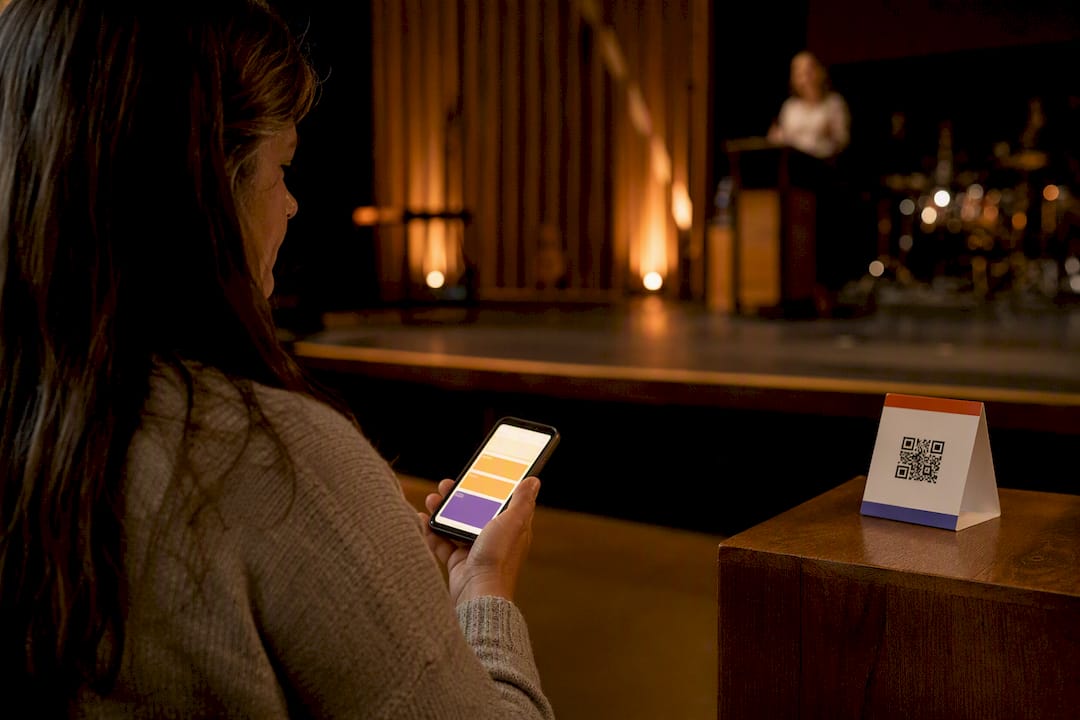
Real-time captions delivered to attendee phones via QR code, paired with at least one visible room caption display, is the setup that satisfies ADA effective-communication expectations without stenographer costs. This is what most organizers actually mean by “obs captions” when researching accessible live events: AI-driven captioning and real-time translation, not a broadcast plugin. A practical, low-cost captioning option to pilot this weekend allows you to build a working QR receiver test in about 15 minutes.
TL;DR:
QR code-based phone captioning supports multilingual audiences and can be tested in about 15 minutes; pairing it with room displays ensures broader accessibility.
Effective communication under ADA and WCAG standards requires documented processes, latency targets under 2.5 seconds, and quarterly accuracy audits; streaming content also mandates captions.
Using a dedicated audio feed and wired internet connection improves caption quality, with fallback plans for latency or accuracy issues needed during live events.
Human CART remains more accurate for high-stakes situations, but AI captioning offers a low-cost, adequate solution for routine events, with hybrid models balancing quality and budget.
Running small, staged pilots focusing on livestream captions first helps organizations identify technical issues early and adapt before expanding to multiple venues.
Table of Contents
-
What Are OBS Captions For Live Events, and How Do You Set Them Up?
-
Can You Offer Real-Time Translation Without Exposing Private Data?
What Are OBS Captions For Live Events, and How Do You Set Them Up?
Getting captions running for a single event takes three phases: before, during, and after. Skip any one of them and you end up with captions that work in rehearsal but fail on show day.
-
Pre-event. Collect accommodation requests early and confirm which spoken languages you need to support. Reserve a clean audio feed from your soundboard, then build your QR or web receiver link and test it on at least three device types (iPhone, Android, older browser).
-
During the event. Route a dedicated audio send into your caption engine, separate from the house mix. Assign someone to watch latency in real time, and keep a human notetaker on standby for any moment where accuracy is non-negotiable, such as legal testimony or medical instructions.
-
Post-event. Export the transcript, publish it if appropriate, and log any accuracy misses so you can flag recurring terminology for tuning.
Churches running weekly services can reuse the same receiver link every week instead of rebuilding it, which cuts setup time to almost nothing after the first pass.
Pro Tip: Test your QR receiver on a phone with cellular data only, not venue Wi-Fi. Attendees who can’t get on your network will still need captions, and that’s the scenario most rehearsals skip.
Does Captioning Satisfy ADA and WCAG Requirements?
The ADA doesn’t mandate a specific technology. It mandates effective communication, and WCAG 2.1 Success Criterion 1.2.4 is the technical benchmark most organizations point to when defining what that means for live, synchronized media. Real-time captioning, including CART, appears among the auxiliary aids the ADA recognizes as acceptable, and that flexibility is good news for organizers on a budget.
A defensible setup isn’t about buying the most expensive tool. It’s about documentation. Build a posture around these practices:
-
A written accommodation request process attendees can actually find
-
Stated response timelines for accommodation requests
-
Latency targets, generally 2.5 seconds or under from spoken word to displayed caption
-
A real-time accuracy target you track, not just assume
-
Quarterly accuracy audits with results logged somewhere reviewable
Public-facing livestreams carry additional exposure under WCAG 2.1 AA, since streamed content gets treated similarly to other digital accessibility obligations. If you’re streaming a service or event to the web, captioning it isn’t optional in any practical sense.
Which Caption Delivery Method Fits Your Venue?
Phone-based delivery through a QR code is the lowest-friction option available. Attendees scan, choose their language if you offer translation, and captions appear on a screen they already have in their pocket. The tradeoff: anyone without a smartphone or with a dead battery is out of luck, which is why phone delivery should rarely stand alone.
-
Phone stream (QR): Best for multilingual audiences who each need a different language on their own screen; no app installation required.
-
Visible room captions: IMAG screens, dedicated caption monitors, or projected overlays. Required in many venues where phone access can’t be guaranteed for every attendee, and useful as a fallback when Wi-Fi struggles.
-
Assistive-listening hardware: Hearing loops, Auracast, or FM/Bluetooth receivers complement captions rather than replace them. Some attendees prefer amplified audio to reading text, and offering both covers more of your audience.
Pro Tip: If your venue seats more than 200 people, put up a visible caption screen even if you’re also offering QR delivery. Phone screens get hard to read from a distance, and older attendees often prefer the big screen anyway.
What Technical Setup Do You Need for Reliable Captions?
Caption quality is only as good as the audio feeding it. A noisy or distorted signal produces garbled text no matter how good the engine is.
-
Audio feed. Pull a clean, dedicated send from the soundboard, ideally a direct line or mix-minus feed rather than a room mic. If your board is analog, a basic USB audio interface bridges it to your caption software.
-
Network. Run a wired connection from the AV booth to your router whenever possible. Cloud-based captioning generally wants at least 25 Mbps upload, and you should separately stress-test venue Wi-Fi under a full mobile caption load before doors open.
-
Latency and accuracy. Aim for 2.5 seconds or less of delay, and keep an eye on word-error rate rather than assuming it’s fine. Have a fallback plan, whether that’s a human notetaker or a second caption engine, if either metric drifts during the event.
How Do You Build a Documented Accessibility Program?
A single successful event doesn’t make an accessibility program. Consistency does, and that requires a few operational habits most organizations skip until they’re forced to.
-
Publish an accommodation request process and commit to responding within two to four weeks.
-
Train at least two AV staff members on the full caption workflow, including what to do when it breaks.
-
Keep a simple runbook: audio routing steps, receiver link, fallback contact.
-
Run quarterly accuracy audits and log which terms or phrases the engine consistently misses.
-
Maintain a public accessibility page listing what’s available and how to request more.
Pro Tip: Your quarterly audit doesn’t need to be formal. Pull five minutes of transcript from your last three events, mark every error, and see if a pattern shows up. Recurring proper nouns and industry jargon are the usual culprits.
Can You Offer Real-Time Translation Without Exposing Private Data?
Captioning and translation are related but distinct. Captioning converts speech to text in the original language; translation converts that text into another language, typically chosen per attendee on their own phone stream.
For medical and legal settings, privacy adds another layer of complexity:
-
Never publish transcripts containing PHI to a public archive.
-
Restrict transcript access to authorized staff when the content touches patient or client details.
How Much Does Live Captioning Cost: CART vs. AI?
Human CART remains the gold standard for accuracy, and it’s priced like one. Rates commonly run $90 to $200 per hour, which makes sense for legal depositions, court proceedings, or any moment where a misheard word carries real consequences.
AI captioning changes the math for everything else:
-
Human CART: highest accuracy available, best reserved for high-stakes or legally sensitive moments.
-
AI captioning: often $0 to $40 per event or service, with accuracy that’s more than adequate for weekly services, conferences, and routine meetings.
-
Hybrid model: reserve human CART for the moments that truly need it, and run AI captioning for everything else. Budget for staff time and any hardware (interfaces, screens) separately from the software cost itself.
For most churches and event organizers, the hybrid model is the only one that scales without draining a budget line meant for other ministry or program costs.
Why a Small Pilot Beats a Big Rollout
Most organizations overbuild their first caption deployment. Start with the livestream only. Once that’s stable, add in-room captions for one recurring event. Only after both prove reliable should you scale across multiple venues or locations.
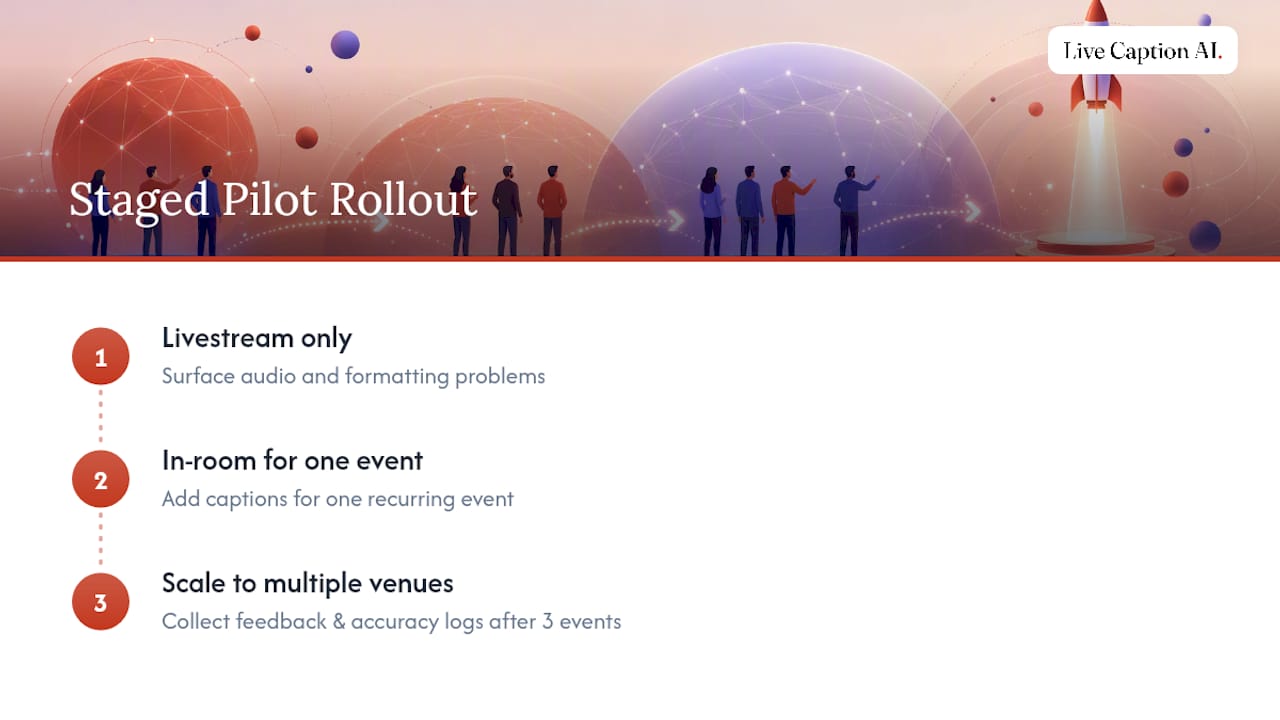
That order matters because livestream captions surface audio and formatting problems fast, without the pressure of a live room full of attendees watching a screen fail. Once you’ve run three events this way, collect attendee feedback directly and pull your accuracy logs before deciding what to fix.
Churches that followed this staged pilot approach report the tuning period gets shorter with every event, since most fixes are vocabulary related, not technical.
— Ryan
How Live Caption AI Fits Your Setup
Some captioning services turn any attendee’s phone into a caption receiver through a simple QR code, with no app download and no hardware rental required. This practical approach allows users to skip the equipment and high costs associated with stenographer bookings and specialized captioning rigs. Industry-specific models may catch terminology generic speech-to-text tools miss, including medical vocabulary, legal terms, or specialized language used regularly.

Where a stenographer session can run into hundreds of dollars per event, some AI captioning services offer paid plans starting at a low monthly rate, with a free tier available to test the basics first. Before your next event, in-person or hybrid, build a QR receiver, run it through a five-minute test with your actual audio setup, and see the transcript quality for yourself. Start your trial and set up your first event at Live Caption AI.
FAQ
What Does “OBS Captions” Mean for Events and Churches?
In this context, it refers to live captioning and real-time translation delivered to attendee devices, typically via QR code, rather than a livestream broadcast tool. The goal is ADA-compliant accessibility for in-person or hybrid audiences.
Is AI Captioning Accurate Enough for Legal or Medical Use?
AI captioning handles routine services and events well, but high-stakes legal testimony or complex medical instructions still benefit from human CART or a hybrid approach that reserves CART for those specific moments.
How Long Should I Give Attendees to Request Accommodations?
Best practice is a documented process with a response window of two to four weeks, published somewhere attendees can actually find it before the event.
What Latency Is Acceptable for Live Captions?
Aim for 2.5 seconds or less between spoken word and displayed text. Anything slower starts to feel disconnected from what’s happening on stage or screen.
Can Live Caption AI Handle Multiple Languages at Once?
In “Conversation Mode” on web only, you may select two primary languages for the system to listen for. It may also recognize other languages spoken and transcribe them, but results will vary. The receiving users can not change the caption languages they see on their devices.