July 25, 2026 · 12 min read
Trade Show Captions for Event Pros: A Practical Guide
Discover how trade show captions enhance engagement and accessibility at events. Learn effective strategies and practical tips for your booth.
TL;DR:
- The most effective trade show captioning combines burned-in open captions with live QR-based captions for comprehensive attendee coverage. Implementing a hybrid approach and starting preparations six weeks in advance ensures successful, accessible, and engaging booth displays. Using QR codes with domain-specific models offers an affordable, easy-to-set-up alternative to costly stenographers for live captioning.
The most effective trade show captioning setup combines large, burned-in open captions on booth screens with optional live device captions delivered via QR code. That hybrid approach covers every attendee: those who glance at your screen for three seconds and those who want to follow a full demo on their phone. For live spoken content, Live Caption AI delivers QR-based captions with domain-specific vocabulary models starting at $19.99/month, which is a fraction of what a stenographer costs for a single day.
What this guide covers:
-
Which caption format to use for each booth situation
-
A pre-show implementation checklist with timeline
-
Copy and design rules that make captions work in noisy halls
-
Budget ranges, KPIs, and plug-and-play templates
Table of Contents
-
How to write booth captions and wall labels that actually work
-
The case for treating captions as a booth strategy, not an afterthought
Why trade show captions belong in every booth plan
Captions reduce friction, increase dwell time, and fulfill ADA expectations. That’s the short version. The longer version is that trade show floors are loud by design, and most attendees decide whether to stop at your booth within three seconds of passing it. If your video loop requires sound to make sense, you’ve already lost them.
Accessibility obligations under the Americans with Disabilities Act apply to public accommodations and events. Captions serve a significant portion of U.S. adults who report some degree of hearing difficulty, and they also serve everyone else in a noisy hall who simply can’t hear your audio.
Engagement data worth knowing:
-
User-generated content and conversion rates from QR scans have shown that captioned display content can drive measurable action at temporary events.
-
Well-chosen quotes on booth displays pause visitor movement and act as silent conversation openers, reducing pressure on staff to initiate every interaction.
Short, captioned content on screens and walls does the selling before your team says a word.
What caption format fits your booth setup?
Not all caption types work equally well in every situation. Here’s how to match format to use case.
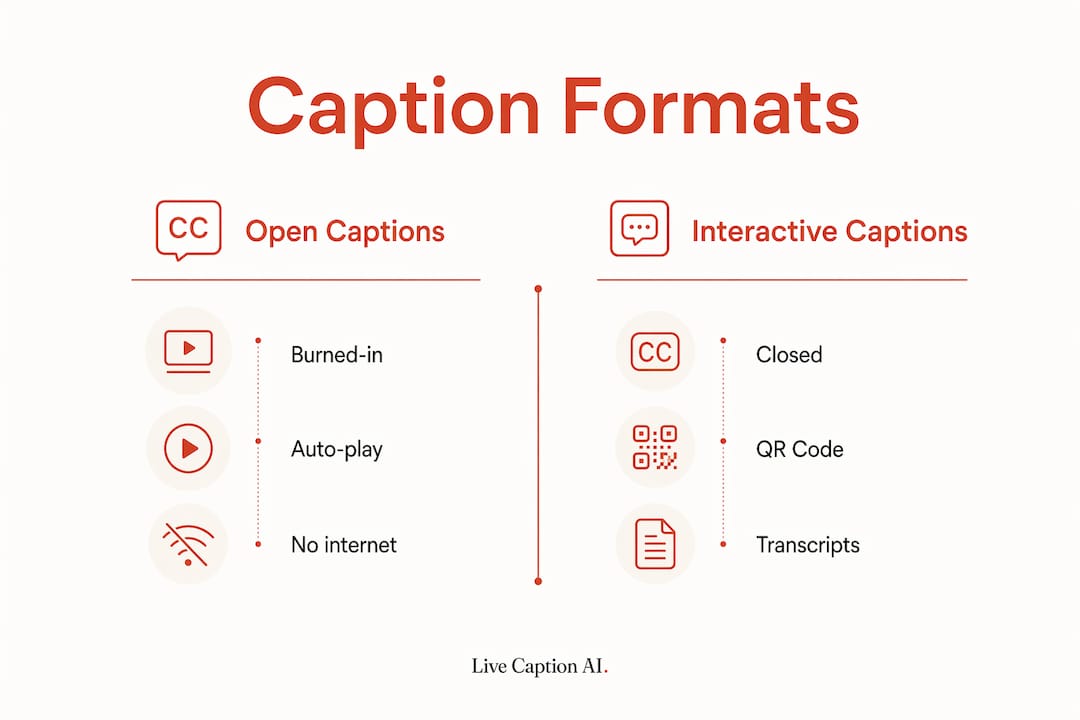
Open (burned-in) captions are baked directly into the video file. They play automatically, require no internet, and work on any screen. Use these for video loops and product demos running on a display. Burn large, high-contrast captions into the file rather than relying on a media player’s closed-caption toggle, which attendees will never find or enable.
Closed captions are toggled on by the viewer or media player. They’re appropriate for recorded content on kiosks where attendees control playback, but unreliable as your primary accessibility layer in a booth environment.
Live QR-delivered captions stream real-time speech-to-text to any attendee’s phone via a QR code. No app download required. This format works best for live demos, panel sessions, and one-on-one conversations where the speaker’s words need to reach multiple people simultaneously. Live Caption AI’s approach turns any phone into a caption receiver instantly.
Transcripts are post-session exports. They don’t serve real-time accessibility, but they’re valuable for follow-up nurture sequences and for attendees who want to review technical content after the show.
| Booth situation | Best format |
|---|---|
| Silent video loop | Burned-in open captions |
| Live product demo | QR-delivered live captions |
| Panel or stage talk | QR-delivered live captions |
| Kiosk self-service | Closed captions |
| Post-show follow-up | Exported transcript |
How to implement captions before and on show day
The biggest captioning failures happen because teams treat it as a last-minute task. Start six weeks out.
Pre-event timeline
-
6–8 weeks out: Confirm screen specs (resolution, aspect ratio) with your AV vendor. Finalize your video loop script and send it to production with burned-in caption requirements noted.
-
2–4 weeks out: Build your domain-specific vocabulary list (product names, acronyms, technical terms). If using Live Caption AI, upload custom vocabulary to improve recognition accuracy. Set up your QR code and test the landing page on iOS and Android.
-
1 week out: Run a full dry run. Play the video loop on a screen the same size as your booth display. Check caption legibility from 10 feet away. Test QR delivery with at least three different devices and carriers.
-
Show day: Arrive with offline video files on a local drive, not a cloud link. Confirm Wi-Fi credentials for live captioning. Brief staff on how to display the QR code and explain it to attendees.
Contingency checklist:
-
Offline backup video file with burned-in captions on USB
-
Screenshot of QR code saved to staff phones (in case the printed sign is damaged)
-
Hotspot device as backup internet for live captioning
Pro Tip: Test your video loop with the sound completely off and the screen at booth distance. If you can’t understand the product and its top three benefits in under five seconds, the captions need to be larger or the script needs to be shorter.
Two of the most common show-day failures are forgetting to burn captions into the video file and relying on live internet streams for playback. Both are preventable with offline files and a pre-show test.
How to write booth captions and wall labels that actually work
The rule from museum curators applies directly here: one insight per label. Visitors read standing up, under time pressure, in a noisy room. They won’t parse a subordinate clause.
Dos:
-
Keep labels to 50–100 words maximum
-
Lead with the one thing a visitor can’t see just by looking at the product
-
Use short sentences and plain language
-
Place quotes on high-visibility surfaces: back walls, canopy valances, header panels
Don’ts:
-
Don’t use jargon or acronyms without immediate explanation
-
Don’t write sentences that require re-reading to understand
-
Don’t bury the key benefit in the second or third sentence
Design and legibility specs
| Label type | Minimum point size | Maximum point size |
|---|---|---|
| Caption label | 16pt | 18pt |
| Group label | 18pt | 22pt |
| Intro/header label | 30pt | — |
(Source: Exhibition Text General Guidelines, UCSB.)
Source: Exhibition Text General Guidelines, UCSB
Use high-contrast color combinations (white on dark, black on white). For quote walls designed to generate social shares, include vertical framing markers and consistent lighting so the wall photographs well for Reels and TikTok.
Pro Tip: Design your quote wall with a phone camera in mind. Stand six feet back, hold your phone in portrait mode, and check that the quote fills the frame cleanly. If it doesn’t, the wall won’t generate organic UGC.
What does captioning actually cost?
Budget based on your booth’s scale and the type of content you’re running.
Typical cost ranges:
| Item | Typical range |
|---|---|
| Stenographer (live captioning) | Several hundred dollars per day |
| Live Caption AI subscription | From $19.99/month |
Software subscriptions cover unlimited QR-delivered sessions within the plan tier. A stenographer charges per day and requires advance booking, travel coordination, and equipment setup. For most booth scenarios, a software subscription handles live captioning at a fraction of the cost.
Selection criteria to evaluate any captioning option:
-
Accuracy: Does it support domain-specific vocabulary for your industry?
-
Latency: Is the delay under two seconds for live speech?
-
Device support: Can unlimited attendees view captions simultaneously?
-
AV integration: Does it work with your existing screens and AV setup?
-
Language support: Can it caption or translate into multiple languages?
-
Privacy/compliance: Does it offer HIPAA-compliant deployment if your content is sensitive?
How do you measure whether captions are working?
Track these KPIs from day one of the show.
-
QR scan rate: Total scans divided by estimated booth traffic gives you caption uptake. Aim to improve this across shows.
-
Dwell time: Staff can log approximate time-at-booth for groups who engaged with captioned content versus those who didn’t.
-
Lead attribution: Tag leads who mention the caption display or who scanned the QR code in your CRM.
-
Social shares: Monitor brand hashtags and location tags for UGC from your quote wall.
-
Transcript downloads: If you offer post-session transcripts, download counts indicate high-intent attendees.
Set up short URLs with UTMs for every QR code so you can track conversions in Google Analytics or your marketing platform. Use a unique coupon code at the booth to attribute in-person conversions that happen after the show.
For qualitative feedback, brief two staff members to ask one question at the end of each demo: “Was the captioning helpful?” That single data point, logged consistently, tells you more than most post-show surveys.
Ready-to-use caption templates and staff scripts
Use these as starting points. Adapt the language to your product and brand tone.
Hero loop captions (burned-in, 5-second display each)
-
“See what [Product] does in 60 seconds.”
-
“No setup. No training. Works on any device.”
-
“Built for [industry]. Trusted by [audience type].”
-
“Ask us for a live demo. Scan the QR code.”
-
“ADA-focused. Starts at $19.99/month.”
Quote wall micro-story sequence (rotate every 30 seconds)
-
“The problem: [one-line pain point].”
-
“The fix: [one-line solution].”
-
“The result: [one-line outcome].”
-
“See it live. Scan below.”
QR landing page microcopy
Staff conversation opener (30-second demo script)
“Thanks for stopping. This screen shows live captions for everything I’m saying right now. Attendees scan that QR code and follow along on their own phone. No app, no setup. Want to see it work?”
Demo checklist for staff:
-
Confirm QR code is visible and scannable from the aisle
-
Speak at a normal pace (captions lag if you rush)
-
Use product names exactly as they appear in the vocabulary list
-
Pause after key points so captions catch up before moving on
Key Takeaways
The most effective trade show captioning strategy pairs burned-in open captions on booth screens with live QR-delivered captions for spoken content, covering every attendee regardless of hearing ability or noise level.
| Point | Details |
|---|---|
| Use a hybrid caption approach | Burned-in captions for video loops; QR-delivered live captions for demos and talks. |
| Start implementation six weeks out | Build vocabulary lists, confirm AV specs, and run a full dry run one week before the show. |
| Write one insight per label | Keep wall labels to 50–100 words, plain language, and no subordinate clauses. |
| Track QR scans and lead attribution | Use UTM-tagged short URLs and staff logging to connect captions to measurable outcomes. |
| Live Caption AI covers live captioning | QR-based delivery, domain-specific models from $19.99/month. |
The case for treating captions as a booth strategy, not an afterthought
Most event teams add captions because someone on the compliance checklist flagged ADA. That’s the wrong starting point, and it shows in the results: captions that are too small to read, burned into the wrong corner of the screen, or absent entirely from live demos.
The teams that get real ROI from captioning treat it as a sales tool first. A well-captioned video loop stops passersby who would have kept walking. A QR code that delivers live captions to a prospect’s phone gives them a reason to stay through the full demo. A quote wall designed for vertical framing generates UGC that extends the show’s reach for days after the floor closes.
The accessibility case is real and non-negotiable. But the engagement case is just as strong, and it’s the argument that gets captioning budgeted properly in the first place. If you’re running a booth without burned-in captions on your loop and a live captioning option for demos, you’re leaving both compliance and conversions on the table.
Live Caption AI makes QR captioning simple for any booth
Stenographers cost hundreds of dollars per day and require advance coordination. No hardware. No stenographer. Any attendee scans the code and follows along on their own phone, in real time.

What event pros get with Live Caption AI:
-
Unlimited device broadcasting via QR code
-
Domain-specific vocabulary models for technical and industry content
-
Exportable transcripts for post-show follow-up
-
Multi-language support and real-time translation
Setup takes minutes. Share a QR code at your booth, and every attendee has captions on their own screen. Start your free trial at livecaptionai.com and have live captioning ready before your next show.
Useful sources
These sources back the practical rules in this guide.
-
Exhibition Text General Guidelines, UCSB Library — Font size and label hierarchy specs for caption, group, and intro labels.
-
How to Write Exhibition Wall Labels, Brandstory — Curatorial rules for 50–100 word labels, simple syntax, and one-insight-per-label guidance.
-
Trade Show Video Production: 10 Booth Ideas, D-MAK Productions — Burned-in caption requirements, offline playback testing, and production cost ranges.
-
Micro-Event Quote Walls Boost Engagement and Sales, BestQuotes — UGC rates, QR conversion data, UTM tracking tactics, and vertical framing guidance.
-
Effective Business Quotes for Exhibition Tents & Trade Show Booths, QuoteBlessings — Placement guidance and evidence that short quotes act as conversation starters.