July 26, 2026 · 12 min read
Best Live Translation App for Organizations in 2026
Discover the best live translation app for organizations in 2026.

organizations without hardware or on-site captioners. It suits event organizers, health systems, legal teams, and educators needing accurate, scalable captioning with domain-specific models. A subscription at $19.99 per month offers a cost-effective alternative to traditional CART services, emphasizing accessibility, compliance, and efficiency.
For U.S. It satisfies the three requirements that matter most to institutional buyers: accessibility delivery that meets ADA expectations, deployment options for medical and legal settings, and predictable subscription pricing that undercuts hourly stenographer costs. No hardware. No dedicated captioner on-site. Any attendee’s phone becomes a caption receiver.
Table of Contents
-
Why consumer translator apps usually fall short for institutional needs
-
What to look for in a live translation app for events, churches, medical, and legal settings
-
How to trial, set up, and run Live Caption AI at your next event
-
Live Caption AI: what the subscription includes and how to start
Who should use a live translation app like this?
Live Caption AI fits a specific set of buyers. If your organization falls into one of these categories, you are the target user:
-
Event organizers running live conferences, town halls, or hybrid sessions with multilingual audiences
-
Churches and houses of worship serving congregations that speak multiple languages
-
Medical practices and health systems needing accurate captioning for staff training, grand rounds, and patient-facing accessibility
-
Legal teams requiring accurate, domain-specific transcription for hearings, depositions, or client meetings
-
Universities and K-12 schools providing classroom accessibility under Section 504 or the ADA
-
AV companies looking to offer captioning as a managed service to event clients
Before committing to any plan, confirm three things: your venue has reliable internet (cloud speech-to-text requires a stable connection), your required languages are covered, and your use case involves specialized vocabulary that generic models may miss.
Why consumer translator apps usually fall short for institutional needs
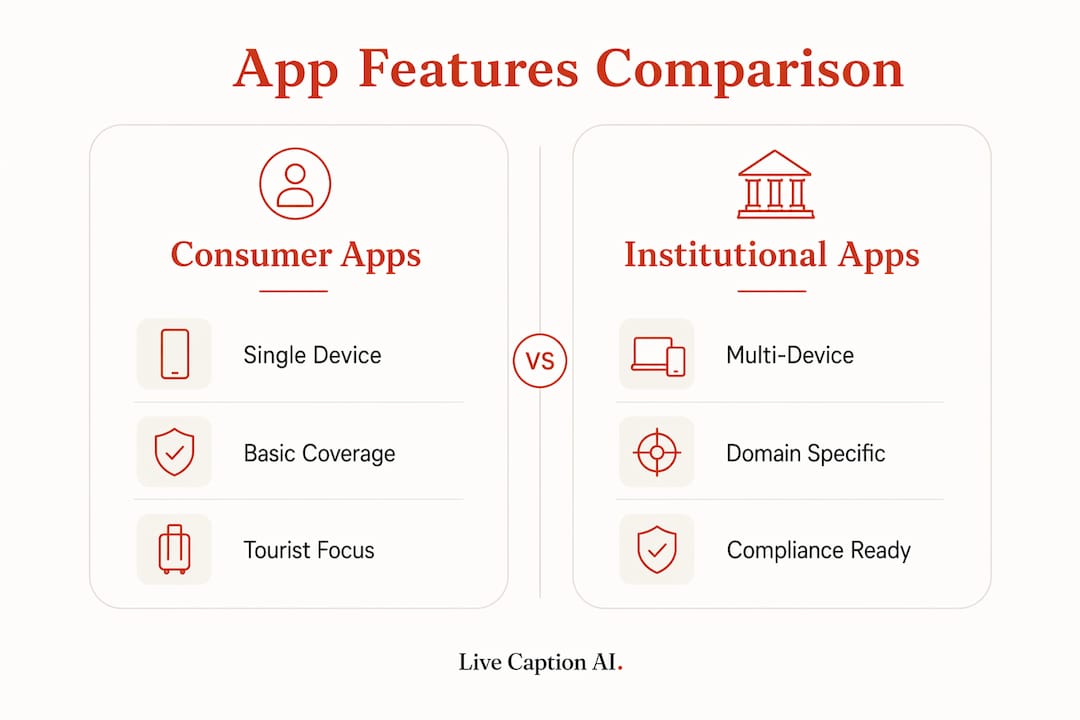
The honest answer: consumer translation apps are built for travelers, not compliance officers. Google Translate supports conversation mode in roughly 70 languages and iTranslate covers 100+ languages with offline packs. Both are genuinely useful for informal exchanges. Neither was designed to broadcast captions to a room of 300 attendees.
The gaps show up fast in institutional settings. Consumer apps run single-device workflows: one person speaks, one person reads. There is no centralized session management, no exportable transcript, and no domain-specific vocabulary model for cardiology or contract law. Latency spikes during peak network load with no fallback. And Google Translate’s personal-use framing makes clear that institutional compliance was never the design goal.
Pro Tip: Consumer apps work fine for a bilingual one-on-one conversation in a break room. For any event where accessibility is a legal obligation or where patient/client data is involved, use a purpose-built platform with session management, exportable transcripts, and domain vocabulary tuning.
What to look for in a live translation app for events, churches, medical, and legal settings
Rank your evaluation criteria in this order. The higher the item, the more it affects legal exposure and operational risk.
-
ADA compliance and accessibility delivery. Can attendees receive captions on their own devices without downloading an app? Does the platform support caption visibility at scale?
-
For medical or legal use, does the vendor offer a Business Associate Agreement? Is session data encrypted and stored in a compliant hosting environment?
-
Domain-specific speech models. Generic speech-to-text misses medical eponyms, legal Latin, and liturgical terms. Ask whether the platform offers specialized models for your field.
-
Latency and scalability. Real-time translation involves accuracy versus latency trade-offs that become critical when a surgeon is dictating or a judge is speaking. Test under realistic network conditions before committing.
-
Deployment and integration. How do attendees access captions? Does setup require IT involvement, or can event staff handle it? Does it connect to your existing conferencing or AV stack?
Ask vendors directly: “Do you sign BAAs?” and “Which speech model handles [your domain]?” Vague answers are a red flag.
How Live Caption AI meets the evaluation criteria

Live Caption AI addresses each institutional requirement directly. The table below maps its features to the buyer checklist.
| Evaluation Criterion | Live Caption AI Capability |
|---|---|
| ADA-compliant caption delivery | Any phone becomes a caption receiver via QR code; no app download required for attendees |
| Domain-specific speech models | Specialized models for medical, finance, and worship vocabulary |
| Real-time multilingual translation | In web Conversation mode, you set two languages, and Deepgram may also recognize other languages it hears in the room, though accuracy is best for the two you select. Translation output goes to the language you choose — 29 are available. |
| Unlimited device broadcasting | Unlimited attendees can follow captions simultaneously |
| Transcript export | Full session records exportable after each event |
| Pricing | Subscription starting at $19.99/month |
On language coverage: the broadcaster selects one spoken language and one translation. language per session, and every attendee sees that pair. Translation covers 29 languages, including Spanish, French, German, Portuguese, Japanese, Chinese, Russian, Italian, Dutch, Korean, Polish, and Ukrainian. In web Conversation mode, you set two languages, and Deepgram may also recognize other languages it hears in the room, though accuracy is best for the two you select. Translation output goes to the language you choose — 29 are available.
Deployment and compliance checklist for ADA settings
Before your first live session, work through these steps. Skipping any one of them is where compliance gaps appear.
Pre-event setup:
-
Confirm what the vendor stores and for how long. Live Caption AI never stores session audio; transcripts are retained under your account until you delete them.
-
Enable the domain-specific speech model that matches your setting (medical, financial, or worship). Also set translation language. if needed.
-
Test caption visibility on at least three different device types (iOS, Android, laptop browser)
-
Train event staff on the broadcaster interface and QR code distribution process; set the URL and QR code to share with your audience so they can view on their own devices.
-
Set up screens to display captions to your audience. (optional)
ADA compliance notes: The ADA requires effective communication for people with hearing disabilities at places of public accommodation. Live captioning satisfies this obligation when captions are accurate, timely, and accessible. Automated captioning with domain-specific models substantially improves accuracy over generic speech-to-text, but for legal proceedings requiring certified transcripts, a licensed court reporter remains the standard.
HIPAA note: Live Caption AI runs a single shared processing pipeline and does not offer a separate compliant deployment or sign Business Associate Agreements, so it should not be used for sessions involving protected health information. What it does do: session audio is never stored — it is streamed for recognition and not persisted. For any vendor you evaluate, always confirm a signed BAA is in place before a session involving patient data.
Pro Tip: Run a full rehearsal with a live microphone at least 24 hours before the event. This catches mic routing issues, network bottlenecks, and model mismatches before attendees are in the room.
Pricing and ROI: How does a subscription compare to CART?
A subscription starting at $19.99/month changes the math on accessibility budgeting. CART (Communication Access Realtime Translation) provided by a certified human captioner typically runs $150–$200 per hour or more, depending on the provider and session length. A single two-hour event can cost more than a full year of a Live Caption AI Professional subscription.
$19.99/month vs. $150–$400/hour for CART. For organizations running weekly services or recurring events, the subscription model pays for itself within the first session.
For a church running 52 Sunday services per year, the annual CART cost at even the low end would be substantial. A university hosting monthly accessibility-required lectures faces the same math. The subscription model converts an unpredictable per-event line item into a fixed monthly cost, which simplifies both budgeting and procurement approval.
Credit packs are also available for organizations with occasional rather than recurring needs, giving you flexibility without committing to a monthly plan.
How to trial, set up, and run Live Caption AI at your next event
The trial flow is straightforward: create a session, select your languages and speech model, test on devices, then share the QR code with attendees.
-
Create a free account and start the 7-day trial. No credit card required.
-
Set up your session. Name it, select the primary language the speaker will use, and choose the target translation language for captions.
-
Enable your domain model. Select medical, finance, worship, or general depending on your setting. Set translation language if desired.
-
Connect your microphone. Route the room’s PA output or use a dedicated mic close to the speaker. Audio quality is the single biggest factor in accuracy.
-
Test on multiple devices. Open the session link on iOS, Android, and a laptop browser before attendees arrive.
-
Share the QR code. Display it on a screen or print it in the program. Attendees scan it and follow captions on their own phones.
-
Monitor live. The broadcaster dashboard shows the live transcript in real time. Watch for model errors and adjust mic placement if needed.
-
Export the transcript after the session for records, accessibility documentation, or follow-up review.
Troubleshooting quick reference:
-
High latency: check network bandwidth; move to a 5GHz Wi-Fi band if available
-
Missed terminology: confirm the correct domain model is active
-
Attendee access issues: verify the QR code links to the correct session and that the session is live
Pro Tip: For live translation in professional settings, a dedicated microphone routed directly from the PA board outperforms any room mic. Invest 10 minutes in audio setup and accuracy improves noticeably.
Key Takeaways
organizations, with a subscription cost that replaces unpredictable per-event CART fees.
| Point | Details |
|---|---|
| ADA compliance is non-negotiable | Any platform you choose must deliver captions to attendees’ own devices without requiring a separate app download. |
| Domain models drive accuracy | Generic speech-to-text misses specialized vocabulary; always enable the medical, finance, general, or worship model for your setting. |
| Subscription beats CART on cost | At $19.99/month, Live Caption AI costs less than a single hour of CART for most organizations. |
| Live Caption AI is the recommended option | It covers ADA delivery, 29-language real-time translation, and unlimited device broadcasting in one platform. |
Where automated captioning works — and where it doesn’t
The case for AI-powered live captioning is strong, but it is not unlimited. Automated captioning with domain-specific models handles the vast majority of institutional use cases well: worship services, conferences, university lectures, medical staff training, and multilingual community events. The accuracy gap between a well-configured AI captioning platform and a human CART provider has narrowed considerably.
Where human captioners remain the right call: certified court transcripts, depositions that will be entered into evidence, and any proceeding where a licensed professional’s signature on the record is legally required. Automated captions are not certified transcripts. For everything else, the combination of accuracy, speed, and cost that a purpose-built platform delivers is hard to argue against.
The organizations that get the most value from Live Caption AI are the ones that stop treating accessibility as a one-off expense and start treating it as infrastructure. A fixed monthly subscription makes that shift possible.
Live Caption AI: what the subscription includes and how to start
Accessibility shouldn’t cost $200 an hour.

The subscription includes ADA-compliant caption delivery to unlimited attendee devices via QR code, domain-specific speech models for medical, financial, and worship vocabulary, real-time translation for 29 languages, AI-powered session summaries, and exportable transcripts. Plans start at $19.99/month. One-off translation credit packs are available for occasional use. Team plans are coming soon at $59.99/month. Business pricing starts at $199/month by request. Start your 7-day free trial at livecaptionai.com. No credit card required. Cancel anytime.
Useful sources and references
-
PCMag: The Best Translator Apps for 2026: Independent roundup of consumer and AI-powered translation tools; useful for understanding the consumer app landscape and its limitations.
-
Google Translate on Google Play: Feature list and language coverage data for Google’s consumer translation app.
-
iTranslate on the App Store: Consumer travel translation app; reference for understanding offline language pack models and their institutional limits.
-
ParakeetAI: Live Language Translation in Interviews — 2026 Guide: Technical background on real-time translation trade-offs, domain model accuracy, and latency considerations for professional settings.
-
Microsoft Translator: Enterprise translation API and real-time conversation features; context for understanding cloud-based translation infrastructure and integration options.